Help centre
How to dispatch orders in Linari WMS
In short. A dispatch is one truck: its driver, its car and the pallets it carries. You build it from completed pallets, confirm it, and issue the dispatch note (Invoice). The dispatch note takes the goods out of stock and closes the orders. Where you use electronic waybills, Linari creates them from the dispatch, ready to send to RS.ge.
- Build the dispatch from completed pallets: Shipment Consolidation on the web, or Dispatch on the handheld.
- Confirm the dispatch.
- Invoice it: Linari issues the dispatch note and finishes the orders.
- With pallets, confirm the pallets that came back (Confirm Pallet).
- Send the waybills to RS.ge on Waybill.
This article covers a warehouse that ships on pallets. Without pallets, the same steps run on Consolidation WP and Dispatch WP.
Before you start
- The pallets are completed. See Check orders.
- You know the driver, the car and, if any, the trailer.
- For electronic waybills, your warehouse is connected to RS.ge. Ask your Linari contact.
Step by step: in the web app
- Open Shipping Management > Consolidation, select the completed pallets for one truck and click Shipment Consolidation. Fill in the Delivery Date and the Shipping Type. Enter the Driver Tin to fill in the Driver and Car No.; add the Trailer No. if there is one. Save: Linari creates the dispatch.
- Open Shipping Management > Dispatch, select the dispatch and click Confirm. To change the driver later, click the driver icon on the row.
- When the truck is loaded, select the dispatch and click Invoice. Linari issues the dispatch note (“Dispatch note #… has been successfully issued.”), takes the goods out of stock, creates the proof-of-delivery records for each customer, and marks the orders Finish.
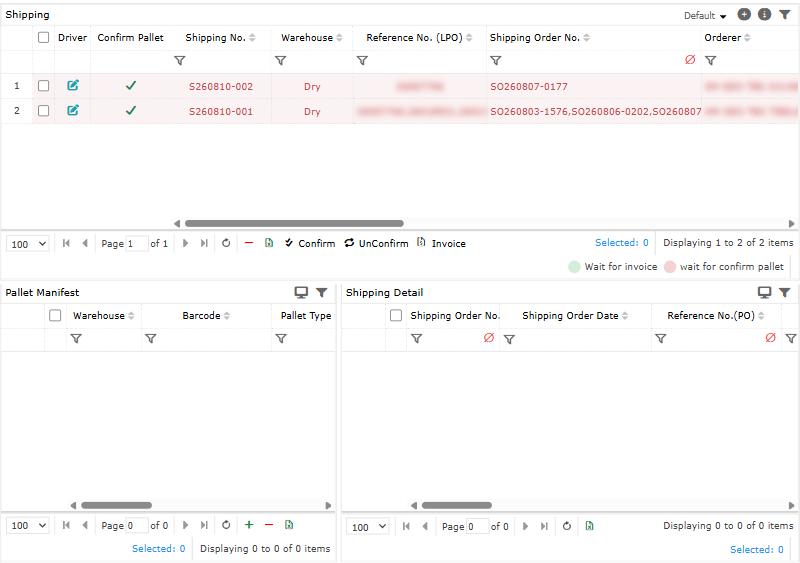
- An invoiced dispatch is listed under Archive. It stays on the Dispatch tab until the pallets that came back are confirmed.
- To undo: UnConfirm works until the dispatch is invoiced. The minus button removes a dispatch that is not confirmed. An invoiced dispatch cannot be undone.
Step by step: on the handheld
- On the home screen, under Shipping, open Dispatch and tap +.
- In Create Shipping, scan the Driver Id, check the Driver and Car No., add the Trailer No. if needed, and scan each Pallet No.. Save.
- Each dispatch shows what it waits for:
– wait for confirm: tap Confirm. – wait for invoice: tap Invoice when the truck is ready; UnConfirm if you need to change it. – wait for confirm pallet: tap Confirm Pallet for the pallets that came back.
- Edit Driver changes the driver and car at any step.
- If pallets for the same customer are still waiting to be loaded, Linari asks whether to dispatch the truck anyway.
Electronic waybills (RS.ge)
When Create Waybill After Invoice is on, the dispatch note creates one waybill per customer, with the driver and car of the dispatch, in status Ready To Send. See RS.ge waybills for how Linari works with the Revenue Service.
- Open Shipping Management > Waybill. By Shipping shows the waybills of each dispatch; By Order, of each order.
- Select the waybills and click Integrate with RS. On the handheld, open Waybill and tap Send To RS.
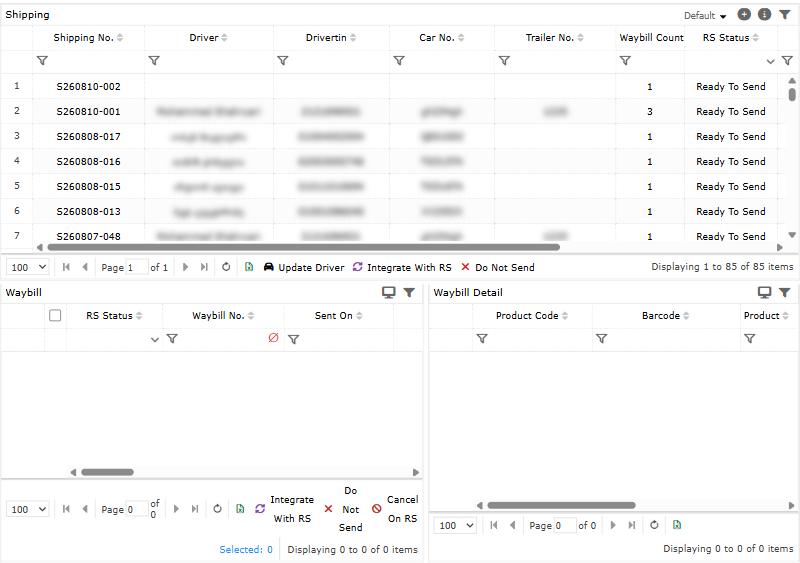
- Follow the RS Status and the Waybill No. RS gives back.
- A waybill that must not go to RS: Do Not Send, before it is sent.
- To cancel a waybill that is already on RS: Cancel On RS, with a reason. This cannot be undone. Sending again creates a new waybill on RS.
| RS Status | Meaning |
|---|---|
| Ready To Send | Created, not sent yet. |
| In Progress | Being sent now. |
| Sent | RS accepted it; the Waybill No. is filled in. |
| Error | RS refused it; the reason is shown. Fix it and send again. |
| Needs Review | RS did not answer. Check on RS before sending again: it may already be there. |
| Do Not Send | Marked not to be sent. |
| Cancelling / Cancelled | Being cancelled, or cancelled on RS. |
How settings change dispatch
Linari sets these during setup; ask your Linari contact to change one.
| Setting | What changes |
|---|---|
| Has Pallet | On: dispatches are built from pallets, and pallets are confirmed after the dispatch note. Off: Consolidation WP and Dispatch WP, without pallets. |
| Has Box On Shipping | Box quantities are entered when a pallet is completed. |
| Has Sealed | The seal number is entered on the proof-of-delivery page (POD). |
| Create Waybill After Invoice | The dispatch note creates the waybills automatically. |
| Create Waybill After Return To Sender | Returns to the sender get waybills too. |
Statuses
A dispatch waits for confirm, then for invoice, then (with pallets) for the pallet confirmation. The order lines become Finish with the dispatch note. For all statuses, see Statuses.
Common problems
| Message | Why | What to do |
|---|---|---|
| Pallets […] must be completed first. | A selected pallet is not completed. | Complete it on Consolidation first. |
| All selected items must be from the same warehouse. | The pallets come from different warehouses. | Build one dispatch per warehouse. |
| Please Fill Driver Info. / Please add some pallet number. | The handheld form is missing the driver or the pallets. | Scan the driver and at least one pallet. |
| Pallet barcode […] is used in shipping number … | The pallet is already on another dispatch. | Remove it there, or use another pallet. |
| This shipping […] has no details. … | The dispatch has no pallets. | Add pallets, or remove the dispatch. |
| Some rows are not confirmed. Cannot create invoice for unconfirmed shipping. | The dispatch is not confirmed. | Confirm it first. |
| Insufficient physical inventory for invoice. | The stock is lower than the dispatch. | Check the stock and the picks of this dispatch. |
| RS could not be reached; nothing was sent. Try again in a few minutes. | RS.ge did not respond. | Send again a little later. |
| RS did not confirm this waybill. It is marked Needs Review … | The answer from RS is unknown. | Check the waybill on RS before you send it again. |
| Waybill has already been sent to RS. | It was sent before. | Nothing to do; see its Waybill No.. |
What happens next
The proof of delivery for each customer is on Shipping Management > POD. To read all statuses, see Statuses.