Help centre
How to count stock in Linari WMS
In short. A stock count (Cycle Count) checks what is really in each location. The supervisor starts a stock taking and gives locations to workers. The worker counts each location on the handheld without seeing the expected quantity. Linari compares the count with the stock and marks the differences, which you can recount up to two more times. The count itself does not change the stock: you correct the differences afterwards.
- Start a stock taking on Inventory Management > Cycle Count.
- Select a worker and locations and click Assign Worker.
- The worker opens Cycle Count on the handheld, counts each product and finishes the location.
- For locations with a difference, assign a recount.
- Correct the stock with Inventory Modify.
Before you start
- Stock counting works in warehouses with locations. The worker needs the Cycle Count permission on the handheld.
- One stock taking at a time: every count task of the previous one must be finished.
- Linari does not stop other work in a location while it is counted. Count a location when nobody is picking or putting away in it, or the count will not match.
Step by step: in the web app
- Open Inventory Management > Cycle Count. In Stock Taking, add a row with a Title and save it. Linari lists every location under CycleCount Location.
- In Worker, select a worker. In CycleCount Location, select the locations to count; filter by zone, aisle, bank, bay or level to pick a section of the warehouse. Click Assign Worker. Linari creates one task per location, listing the products the location should hold.
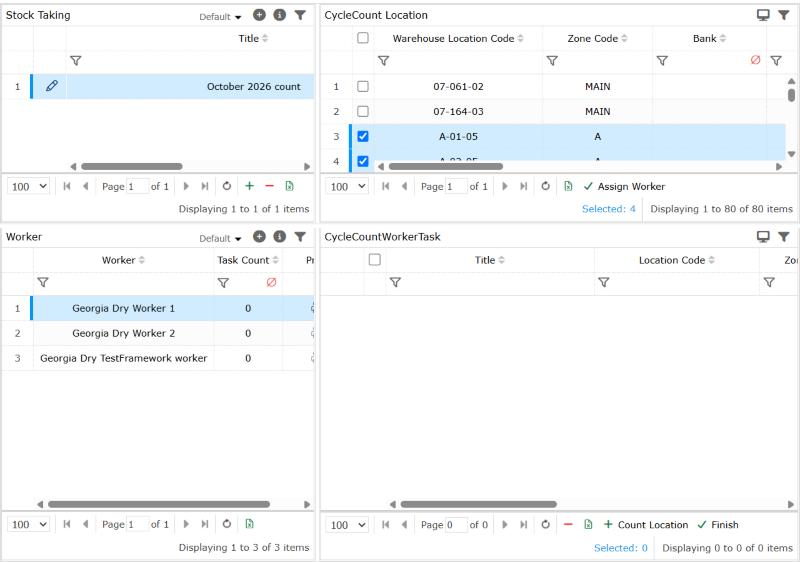
- Task Count shows how many locations the worker still has to count. Print gives the worker a counting sheet.
- Follow the progress under CycleCount Location: Count Done when the first count is finished, Count Conflict when it differs from the stock.
- For a location with a difference, select it and click Assign Worker again. The recount covers only the products that differed. A third count is possible in the same way; the columns ReCheck and Final Check follow the second and third count.
- A supervisor can also count from the web: in the worker’s task, Count Location adds a product with its quantity, Update Quantity changes a counted line, and Finish closes the location.
- Correct the stock for each confirmed difference on Inventory Management > Inventory Modify. The count does not do it for you.
Step by step: on the handheld
- On the home screen, under Stock, open Cycle Count. You see the locations given to you; search by location, or sort by date or by location.
- Tap a location. The list shows the products expected there, with Product Code, Barcode, Status and Exp Date, but not the quantity: count what is really there.
- Tap a product, or scan its barcode, and enter the Quantity in Count Location. Tap Save.
- Found a product that is not on the list? Tap + and enter the Barcode, Quantity, Status and Exp Date. The + button appears only when Enable Add Extra In Cycle Count is on in Settings.
- When every product is counted, tap the tick at the top right and confirm “Are you sure to confirm finish counting of this location?”. The location leaves your list.
A location that should be empty has no products on its list: check it and finish it.
Statuses
Each location in CycleCount Location carries these marks.
| Mark | Meaning |
|---|---|
| Count Done | The first count is finished. |
| Count Conflict | The first count differs from the stock. |
| ReCheck Done / ReCheck Conflict | The same for the second count. |
| Final Check Done / Final Check Conflict | The same for the third count. |
| Is Empty | The location holds no stock. |
Common problems
| Message | Why | What to do |
|---|---|---|
| all task must be done to create new cycleCount. | A count task from an earlier stock taking is still open. | Finish or delete the open tasks first. |
| Please select a worker / Please select a location | Nothing is selected in one of the grids. | Select a worker and at least one location. |
| This location is being counted. You cannot assign a new worker. | The location already has an open count task. | Let the worker finish it, or delete the task. |
| This location has no discrepancy to recheck or final check. | The last count matched the stock. | No recount needed. |
| A location cannot be assigned to a worker more than 4 times. | The location was assigned the maximum number of times. | Correct the stock with Inventory Modify. |
| You cannot finish a task before every product is counted. | Some products on the list are not counted yet. | Count every product, then finish. |
| You cannot count a location that is done. | The location was already finished. | Ask the supervisor for a recount. |
| Barcode […] is not in the system. | The barcode is not a Linari product. | Check the barcode, or ask for the product to be added. |
| The product has an expiration date. You must enter it. | The product is tracked by expiry. | Enter the Exp Date. |
| You cannot delete a task that is done. / Some lines are already counted. You cannot delete the task. | The task is finished, or counting has started. | Keep the task; recount if needed. |
What happens next
Correct the differences on Inventory Modify. To read the location marks and other statuses, see Statuses.